Category: Shape Pack 1

  • 4 Shape Engine: Our configurable base shape

    ShapeEngine is the third step in the pack and the point where the shape gains internal structure. It builds on ShapeWithVariables by replacing all hard‑coded values with CSS Custom Properties.

    Screenshot of the ShapeEngine component, showing a centered CSS cube on a black background.
    Current state of the shape, shown here as the ShapeEngine component on a black background.

    The goal of this step is to complete the foundation of an extensible CSS shape.

    The folder includes:

    • an updated HTML file with the simple shape, in this case a cube
    • a CSS file that replaces all hard‑coded values in the transforms with CSS Custom Properties
    • a short note describing what changed from ShapeWithVariables

    The code below shows the base HTML for the shape.

    <div class="scene">
            <div class="shape">
                    <div class="shape__face shape__face--front">FRONT<br />ShapeEngine</div>
                    <div class="shape__face shape__face--left">LEFT</div>
                    <div class="shape__face shape__face--back">BACK</div>
                    <div class="shape__face shape__face--right">RIGHT</div>
                    <div class="shape__face shape__face--top">TOP</div>
                    <div class="shape__face shape__face--bottom">BOTTOM</div>
            </div>
    </div>

    The code below shows the current CSS for the shape.

    
    :root
    {
            --shape-size: 200px;
            --shape-depth: 200px;
            --panel-count: 6;
            --panel-gap: 0px;
    
            --rotate-x: -20deg;
            --rotate-y: 25deg;
            --rotate-z: 0deg;
    
            --perspective: 800px;
            --perspective-origin-x: 50%;
            --perspective-origin-y: 50%;
    
            --animation-duration: 2000ms;
            --animation-easing: ease-in-out;
    
            --face-front-rotate: 0deg;
            --face-left-rotate: -90deg;
            --face-back-rotate: 180deg;
            --face-right-rotate: 90deg;
            --face-top-rotate: 90deg;
            --face-bottom-rotate: -90deg;
    }
    
    body
    {
            margin: 0;
            min-height: 100vh;
            display: flex;
            align-items: center;
            justify-content: center;
            background: #05060a;
            color: #f5f5f5;
            font-family: system-ui, -apple-system, BlinkMacSystemFont, "SF Pro Text", "Segoe UI", sans-serif;
    }
    
    .scene
    {
            width: 200px;
            height: 200px;
            perspective: 800px;
            perspective-origin: 50% 50%;
    }
    
    .shape
    {
            position: relative;
            width: 100%;
            height: 100%;
            transform-style: preserve-3d;
            transform: rotateX(-20deg) rotateY(25deg) rotateZ(0deg);
            transition: transform 2000ms ease-in-out;
    }
    
    .shape__face
    {
            position: absolute;
            width: 100%;
            height: 100%;
            display: flex;
            align-items: center;
            justify-content: center;
            background: linear-gradient(135deg, #1b1f2a, #2c3244);
            outline: 1px solid rgba(255, 255, 255, 0.15);
            box-sizing: border-box;
    }
    
    /* ONLY the rotation values replaced */
    .shape__face--front { transform: rotateY(var(--face-front-rotate)) translateZ(calc(var(--shape-depth) / 2)); }
    .shape__face--left { transform: rotateY(var(--face-left-rotate)) translateZ(calc(var(--shape-depth) / 2)); }
    .shape__face--back { transform: rotateY(var(--face-back-rotate)) translateZ(calc(var(--shape-depth) / 2)); }
    .shape__face--right { transform: rotateY(var(--face-right-rotate)) translateZ(calc(var(--shape-depth) / 2)); }
    .shape__face--top { transform: rotateX(var(--face-top-rotate)) translateZ(calc(var(--shape-depth) / 2)); }
    .shape__face--bottom { transform: rotateX(var(--face-bottom-rotate)) translateZ(calc(var(--shape-depth) / 2)); }
    

    What changed from the previous step.

    • Change: Completed the move from fixed transform values to fully variable‑driven transforms.
    • Reason: Make the shape fully adjustable through Custom Properties while keeping the component simple and readable.

    This step completes the core of the shape engine. With all key values now driven by Custom Properties, the component becomes flexible without adding complexity, and the progression reaches its intended foundation.


    Jump to this component
    Download Shape Pack
    Browse all components
  • 3 ShapeWithVariables: Adding Custom Variables for Future Flexibility

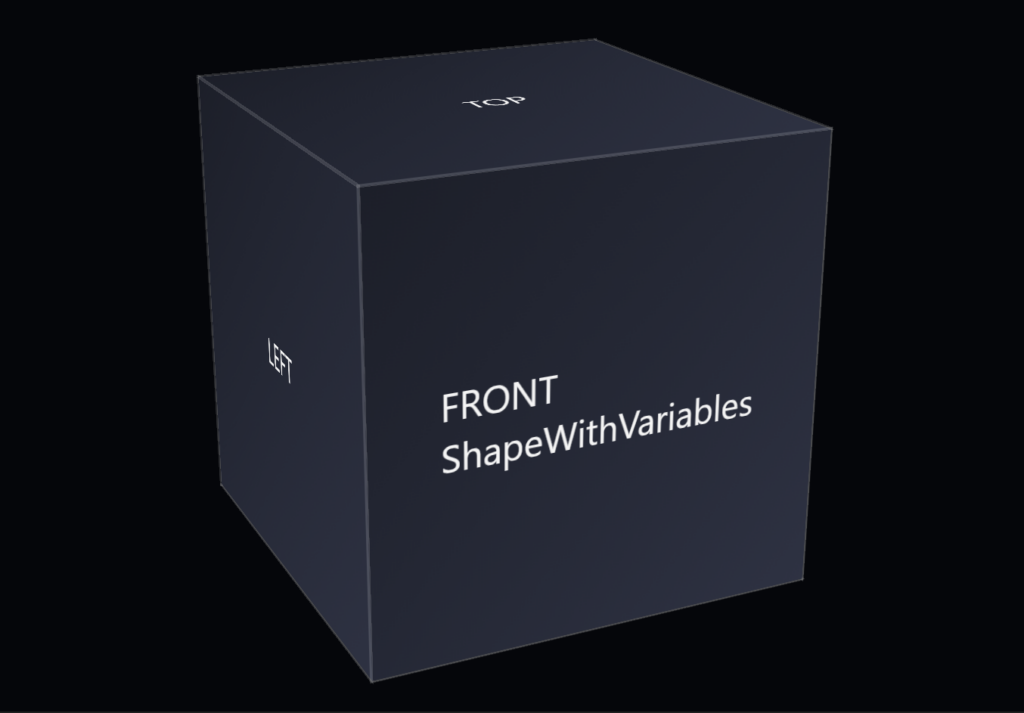
    ShapeWithVariables is the second step in the pack and the first moment where the shape gains a bit of structure. It takes the minimal form from SimpleShape and introduces a small set of CSS variables to make the component easier to adjust without changing the core rules.

    Screenshot of the ShapeWithVariables component, showing a centered CSS cube on a black background.
    Current state of the shape, shown here as the ShapeWithVariables component on a black background.

    The goal of this step is flexibility. By moving key values—like size, color, or border thickness—into variables, the shape becomes easier to tune while still staying simple and readable. The component remains minimal, but now it has room to adapt.

    The folder includes:

    • an updated HTML file using the same basic structure
    • a CSS file that replaces fixed values with a few clear variables
    • a short note describing what changed from SimpleShape

    This example shows the base HTML for the CSS 3d shape.

    <div class="scene">
            <div class="shape">
                    <div class="shape__face shape__face--front">FRONT<br />ShapeWithVariables</div>
                    <div class="shape__face shape__face--left">LEFT</div>
                    <div class="shape__face shape__face--back">BACK</div>
                    <div class="shape__face shape__face--right">RIGHT</div>
                    <div class="shape__face shape__face--top">TOP</div>
                    <div class="shape__face shape__face--bottom">BOTTOM</div>
            </div>
    </div>

    The example shows the new CSS for the CSS 3d shape.

    :root
    {
            --shape-size: 200px;
            --shape-depth: 200px;
            --panel-count: 6;
            --panel-gap: 0px;
    
            --rotate-x: -20deg;
            --rotate-y: 25deg;
            --rotate-z: 0deg;
    
            --perspective: 800px;
            --perspective-origin-x: 50%;
            --perspective-origin-y: 50%;
    
            --animation-duration: 2000ms;
            --animation-easing: ease-in-out;
    }
    
    body
    {
            margin: 0;
            min-height: 100vh;
            display: flex;
            align-items: center;
            justify-content: center;
            background: #05060a;
            color: #f5f5f5;
            font-family: system-ui, -apple-system, BlinkMacSystemFont, "SF Pro Text", "Segoe UI", sans-serif;
    }
    
    .scene
    {
            width: 200px;
            height: 200px;
            perspective: 800px;
            perspective-origin: 50% 50%;
    }
    
    
    .shape
    {
            position: relative;
            width: 100%;
            height: 100%;
            transform-style: preserve-3d;
            transform: rotateX(-20deg) rotateY(25deg) rotateZ(0deg);
            transition: transform 2000ms ease-in-out;
    }
    
    .shape__face
    {
            position: absolute;
            width: 100%;
            height: 100%;
            display: flex;
            align-items: center;
            justify-content: center;
            background: linear-gradient(135deg, #1b1f2a, #2c3244);
            outline: 1px solid rgba(255, 255, 255, 0.15);
            box-sizing: border-box;
    }
    
    .shape__face--front { transform: translateZ(calc(var(--shape-depth) / 2)); }
    .shape__face--left { transform: rotateY(-90deg) translateZ(calc(var(--shape-depth) / 2)); }
    .shape__face--back { transform: rotateY(180deg) translateZ(calc(var(--shape-depth) / 2)); }
    .shape__face--right { transform: rotateY(90deg) translateZ(calc(var(--shape-depth) / 2)); }
    .shape__face--top { transform: rotateX(90deg) translateZ(calc(var(--shape-depth) / 2)); }
    .shape__face--bottom { transform: rotateX(-90deg) translateZ(calc(var(--shape-depth) / 2)); }

    What changed from the previous step.

    • Change: Introduced a small set of CSS variables to replace fixed values.
    • Reason: Make the shape easier to adjust while keeping the component simple and readable.

    This step shows how a shape can evolve without becoming complicated. Variables give you control, but the component stays small, direct, and easy to understand.

    Jump to his component
    Browse all components
    Download the full pack

  • 2 ShapeSimple: The First Iteration of Our Shape Component System

    This step focuses on clarity. ShapeSimple removes variables, layers, and abstractions so you can see the core structure without anything extra. It’s the cleanest version of the shape and the starting point for the entire progression.

    Screenshot of the SimpleShape component, showing a centered CSS cube on a black background
    Current state of the shape, shown here as the SimpleShape component on a black background.

    The folder contains three small files:

    • an HTML file with the basic element structure
    • a CSS file with the minimal rules needed to form the shape
    • a short note describing what this step introduces

    The following code snippet contains the base HTML for the CSS 3d shape.

    <div class="scene">
            <div class="shape">
                    <div class="shape__face shape__face--front">FRONT<br />ShapeSimple</div>
                    <div class="shape__face shape__face--left">LEFT</div>
                    <div class="shape__face shape__face--back">BACK</div>
                    <div class="shape__face shape__face--right">RIGHT</div>
                    <div class="shape__face shape__face--top">TOP</div>
                    <div class="shape__face shape__face--bottom">BOTTOM</div>
            </div>
    </div>
    

    The following code snippet contains the CSS for the CSS 3d shape’s first iteration.

    body
    {
            margin: 0;
            min-height: 100vh;
            display: flex;
            align-items: center;
            justify-content: center;
            background: #05060a;
            color: #f5f5f5;
            font-family: system-ui, -apple-system, BlinkMacSystemFont, "SF Pro Text", "Segoe UI", sans-serif;
    }
    
    .scene
    {
            width: 200px;
            height: 200px;
            perspective: 800px;
            perspective-origin: 50% 50%;
    }
    
    .shape
    {
            position: relative;
            width: 100%;
            height: 100%;
            transform-style: preserve-3d;
            transform: rotateX(-20deg) rotateY(25deg) rotateZ(0deg);
            transition: transform 2000ms ease-in-out;
    }
    
    .shape__face
    {
            position: absolute;
            width: 100%;
            height: 100%;
            display: flex;
            align-items: center;
            justify-content: center;
            background: linear-gradient(135deg, #1b1f2a, #2c3244);
            outline: 1px solid rgba(255, 255, 255, 0.15);
            box-sizing: border-box;
    }
    
    .shape__face--front { transform: translateZ(100px); }
    .shape__face--left { transform: rotateY(-90deg) translateZ(100px); }
    .shape__face--back { transform: rotateY(180deg) translateZ(100px); }
    .shape__face--right { transform: rotateY(90deg) translateZ(100px); }
    .shape__face--top { transform: rotateX(90deg) translateZ(100px); }
    .shape__face--bottom { transform: rotateX(-90deg) translateZ(100px); }

    What changed from the previous step.

    • Change: This is the first step, so nothing is being modified yet.
    • Reason: Establish a clean, minimal foundation for all later shapes.

    This component sets the foundation for the rest of the pack. Every later shape builds on this one, adding structure or behavior in small, deliberate steps.


    Jump to this component
    Browse all components
    Download the full pack

  • 1 Introducing Shape Pack 1: A Set of Shape‑Based UI Components

    The Shape Pack is a small collection of components that show how a simple shape evolves through clear, incremental steps.

    Screenshot of the SimpleShape component, showing a centered CSS cube on a black background
    Current state of the shape, shown here as the SimpleShape component on a black background.

    This pack collects a small set of shape components arranged in a simple progression. Each folder represents one stage of the shape’s build, from the first basic form to more structured versions. The pack started as a way to explore simple, readable component structure.

    The files are kept separate and readable so you can open any component and understand what it’s doing without tracing through a larger system.

    The structure is consistent across the pack. Every component has its own HTML, its own CSS, and a short note describing what changed from the previous step. This makes the progression easy to follow whether you move through it in order or jump between pieces. The pack isn’t tied to a framework or a specific workflow, so it can fit into different projects or be used as a reference on its own.

    The pack shows how a shape can evolve through small, deliberate steps, and it keeps each step isolated so the ideas stay easy to see. You can use the components directly, adapt them, or treat the pack as a starting point for your own variations.

    Download the full pack
    Browse all components